Courses your crews finish, on any screen
Turn your inductions, procedures and toolbox talks into short video courses. Build them from video, text, images, files, checklists and quick checks, and publish each change as a release.

- The live release, and the rule that keeps learners on the one they started
- A lesson’s materials in order: a video, a text and a checklist
- Video uploaded once and played privately
Authoring
Build a lesson from what you already have
Upload a short video shot on a phone, add the procedure as text, attach the SDS or site map, and finish with a checklist or a quick check.
- Video is processed for streaming and stored privately; uploads are scanned before use
- Captions and a transcript beside every video
- Modules, sections and lessons, with prerequisites when order matters
- Preview the course as a learner before you publish
Learning
Made for a phone on a break
Learners see what’s due today, open their next lesson and mark it complete themselves. A video playing to the end is never recorded as completion.
- Today, Courses, Calendar and Record, in four tabs on a phone
- Installs to the home screen like an app
- Due dates in a calendar, with a feed for Outlook or Google Calendar
- Messages to and from a mentor or instructor
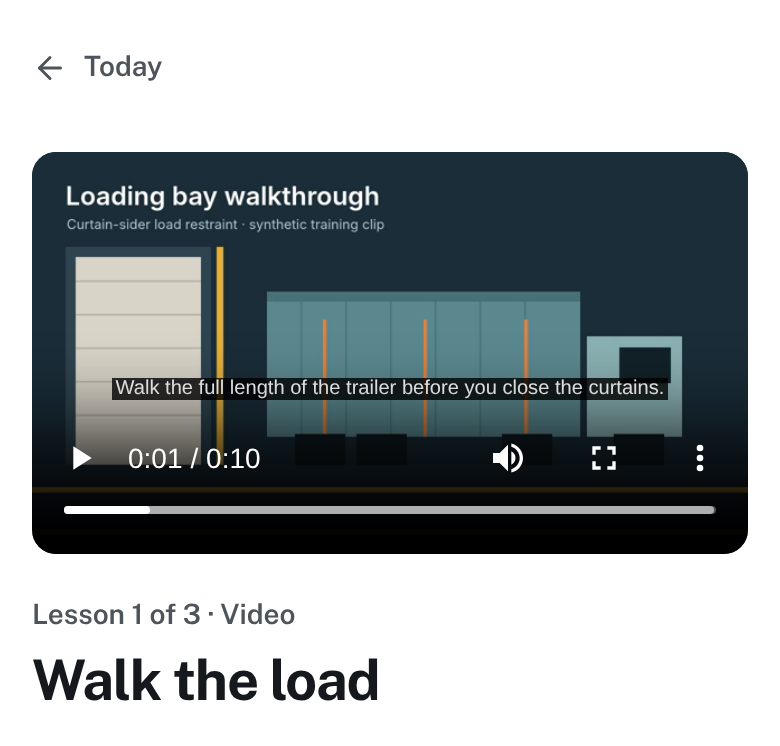
- Captions on the video, with the transcript beside it
- Where the lesson sits in the course
- Back to Today, which lists what’s due
Releases
Change a course without rewriting anyone’s progress
Publishing makes a new release. People already enrolled stay on the release they started, so their progress and their record still say what they actually completed.
- Draft, review and publish, with a history of every release
- Each certificate names the course it was earned on
- Copy a course, or export it as a FreightReady course archive to import into another workspace
Also in Training and courses
Quick checks and assessments
Question banks, pass marks, attempt limits and rubrics, with submitted work reviewed by an instructor.
Cohorts and learning paths
Group a crew into a cohort, or chain courses into a path with its own completion rule.
Announcements and conversations
Tell a site or a cohort about a change, and keep two-way conversations in an inbox.
Mentors for new starters
Mentors see only the learners assigned to them, with check-ins, goals and support plans.
Questions
Do you supply the course content?
No. You bring your procedures, site rules and videos; FreightReady delivers them, tracks completion and issues the certificates. We can help you structure your first course during setup.
Can we bring in courses we already have?
Yes. SCORM 1.2 packages play inside a lesson, and Common Cartridge 1.4 packages can be imported. Video, documents and images upload directly.
More of the platform
Certificates and verification
Certificates anyone can check by number or QR code
Compliance reporting
Who is current, by site, with audit exports
Branding and sign-in
Your name, logo and sign-in page, with passkeys and single sign-on
Integrations
API, webhooks, LTI, OneRoster, SCORM and calendar feeds
Book a walkthrough
Bring one of your inductions to the walkthrough
Send us a procedure or a short video and we’ll show you how it becomes a course your crews finish on a phone.